Last updated October 30, 2026
ServiceFast by ServiceLinked (a service of J & M Billing LLC, Hialeah, Florida) texts homeowners only when they ask for it. Every message comes from our one ServiceFast number. We never buy, sell or share phone numbers.
At servicefast.servicelinked.net, from a link their own service pro gives them after a job, or from servicelinked.net/servicefast.
Directly under the number box, before the button, the page says: "By tapping "Text me a code", you agree to receive a one-time sign-in code by text from ServiceFast by ServiceLinked. One message per request. Msg & data rates may apply. Reply STOP to opt out, HELP for help. We never sell your number." with links to our privacy policy and SMS terms.
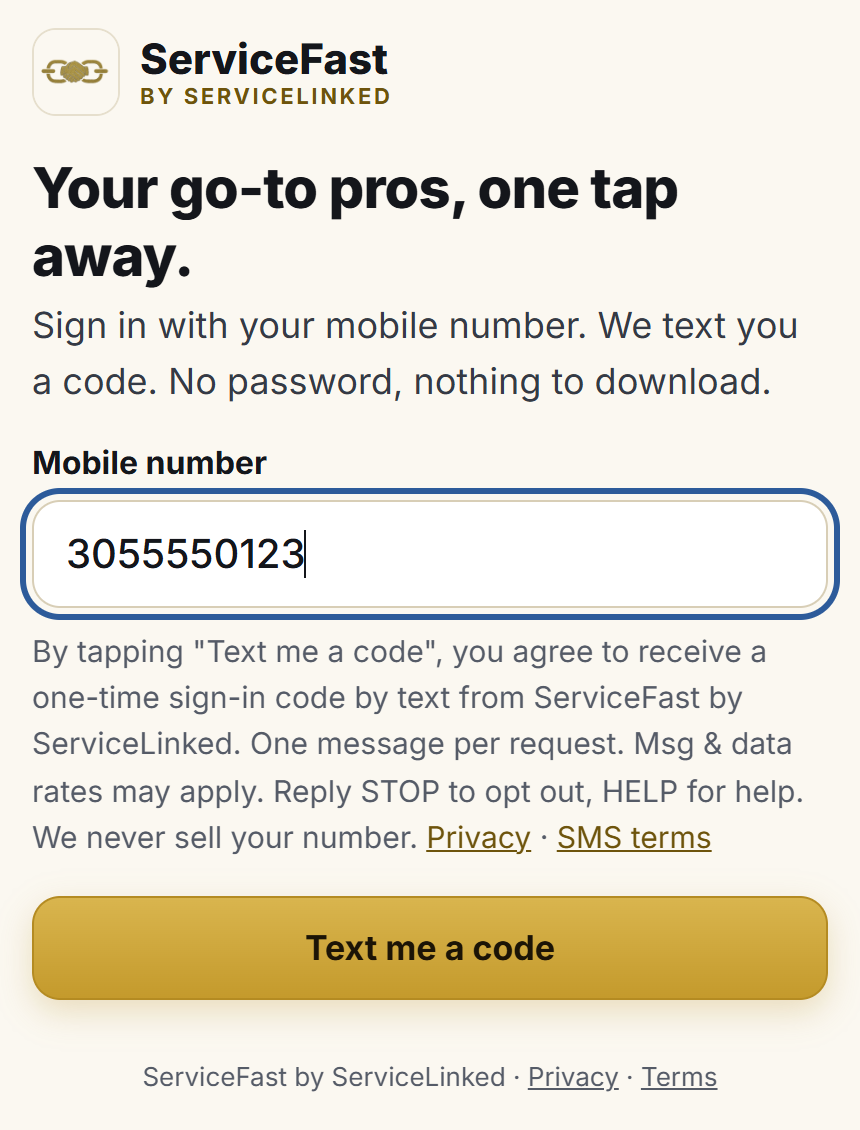
We send one message: "ServiceFast: your sign-in code is 482913. It expires in 10 minutes. Reply STOP to opt out." They type the code to sign in.
We may send account notices about the pros saved in their account (for example: "ServiceFast: Queen City Plumbing linked with you. Open the app to call them anytime: https://servicefast.servicelinked.net Reply STOP to opt out."), usually no more than a few a month. Promotional texts are sent only if the homeowner separately checks the unchecked-by-default promo box in their ServiceFast settings.
Reply STOP to any message to stop. Reply HELP for help. Message and data rates may apply. Full SMS terms and privacy policy.